Hack The Box · Forensics
Persistence
Examining a Windows Registry hive to identify the mechanism that re-establishes a malicious connection after reboot.
Challenge details
| Name | Persistence |
|---|---|
| Hint | Strange connections return from a critical PC even after antivirus cleanup and reboot. Review the supplied system files to determine how persistence is being maintained. |
| Difficulty | Easy · Retired [0] |
| Rated difficulty |  |
| First blood | HTB-Bot |
| Creator | felamos |
Inspect the Registry hive
The challenge provides a file named query. Running file query identifies it as a Windows Registry hive. Because the challenge is named Persistence, the logical places to inspect are startup locations such as HKCU\Software\Microsoft\Windows\CurrentVersion\Run.
Use reglookup in Kali and filter the output for the Windows Run key:
reglookup query | grep /Windows/CurrentVersion/Run

/Software/Microsoft/Windows/CurrentVersion/Run,KEY,,2020-10-27 04:38:55
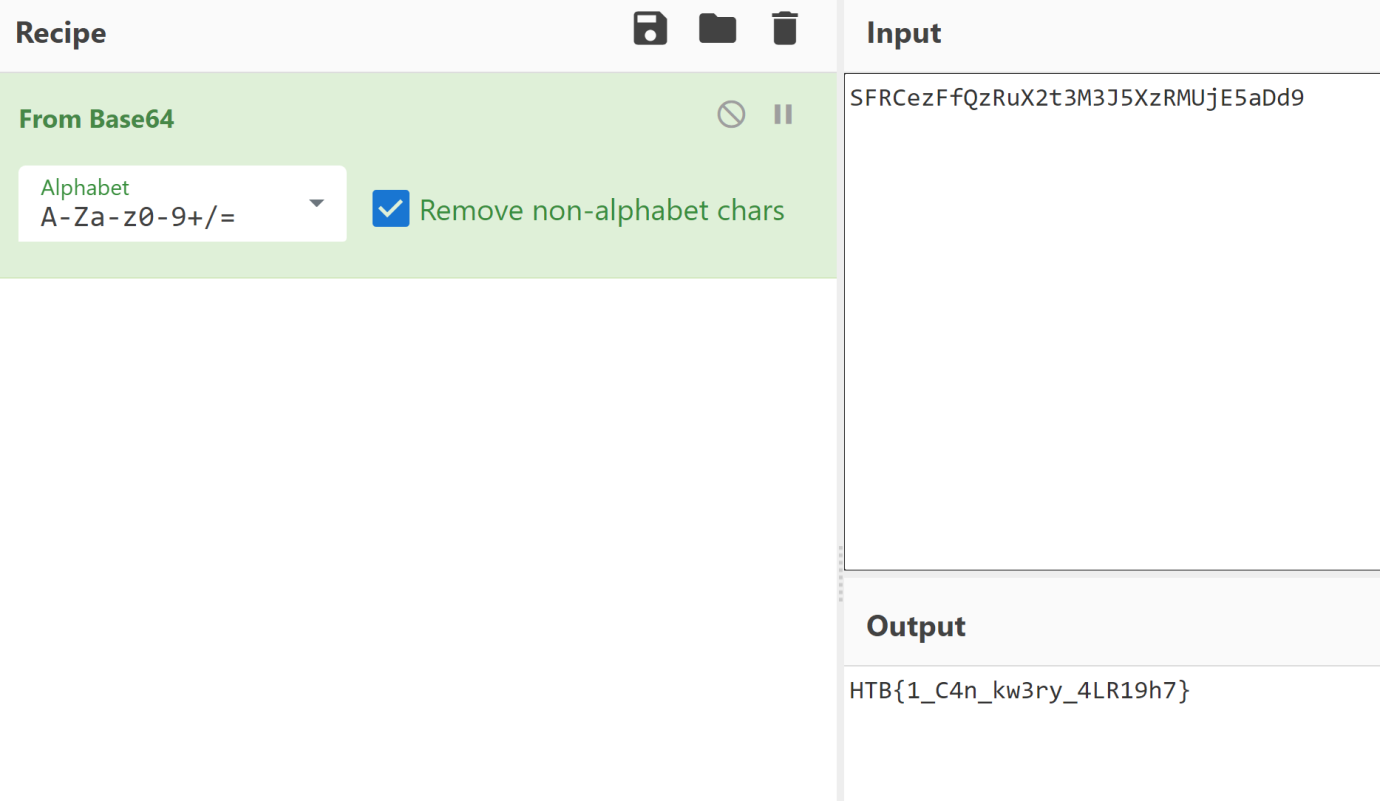
/Software/Microsoft/Windows/CurrentVersion/Run/Windows Update,SZ,C:\Windows\System32\SFRCezFfQzRuX2t3M3J5XzRMUjE5aDd9.exe,
The executable name is Base64-encoded. Decoding SFRCezFfQzRuX2t3M3J5XzRMUjE5aDd9 reveals the flag.
Flag: HTB{1_C4n_kw3ry_4LR19h7}